How to Create Viral Horror Videos with AI – Khooni Monday Style
Create Viral Horror Videos Like Khooni Monday With AI
(Simple Step-by-Step Prompt-Based Guide)
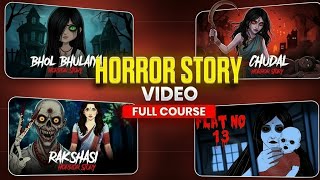
Create Viral Horror Videos with AI like Khooni Monday is no longer difficult. With the help of AI, you can generate horror topics, voice scripts, visuals, thumbnails, channel branding, and even profile images — all without shooting a single scene.
This post is purely prompt-based. You don’t need creativity, scripting skills, or editing experience. Just follow the steps exactly as written below.
How This System Works (Quick Overview)
This workflow is divided into five simple parts:
-
Horror topic & voice script generation
-
Image & scene generation
-
Thumbnail creation
-
Channel name branding
-
Profile image generation
You use ready-made prompts, and AI does the rest.
1. Horror Topic Generator & Voice Script Prompt
Use this three-step master prompt system to generate Khooni Monday–style horror scripts.
Step 1: Generate Horror Topics
Send this prompt first:
“Generate 12 unique Hindi horror topic ideas in Khooni Monday style. Each idea should be 1–2 lines, different settings and twists: urban legends, school/hostel, family curses, folk horror, tech/paranormal, travel/road, hospital/night-shift. After the list, ask me only: ‘Pick one idea number. Then tell me your voice script duration (minutes).’ Do not write any script yet.”
This will give you 12 ready horror ideas.
Step 2: Choose Idea & Duration
Reply like this:
“Idea 7, duration 8 minutes.”
That’s it.
No explanation needed.
Step 3: Generate the Final Voice Script
Now send this prompt:
“Now write a continuous Hindi horror voice script in Khooni Monday style matching my chosen idea for exactly X minutes.
Rules:
• Voice: first-person confessional or close third-person narration in conversational Hindi; minimal dialogue blended inside narration; no speaker labels.
• Structure: eerie hook → rising incidents → midpoint reveal → escalation → twist/lingering end; steady slow-burn.
• Length/pacing: ~120–140 words per minute to fit X minutes; short paragraphs; no titles, no headings, no scene numbers, no cast, no cuts. Output only the script text.
• Sensory cues inline in brackets, used sparingly: [कदमों की आहट], [दूर घंटी], [हवा सरसराती है], [दरवाज़ा चरमराया].
• Cultural vibe: Indian settings, folklore flavor, ‘सच्ची कहानी’ feel; avoid graphic gore.”
Now you have a complete Hindi horror voice script ready for video.
2. Image & Scene Generation Prompt (Very Important)
This prompt converts your voice script into visuals.
When you type xyz, the AI will do everything automatically.
Image Prompt (Use Exactly This)
“When I type ‘xyz’, do the following in order:
Ask me: ‘Paste your final Hindi horror voice script below.’ Wait.
After I paste the script, estimate duration at ~120–140 wpm and show: ‘Estimated duration: X minutes (Y words).’ Then continue automatically.
Create ONE Master Image Prompt that matches this reference style: bright yet moody 2D cartoon, smooth vector-like shading, bold character outlines, simple geometric backgrounds, limited props, cool blue/teal night palette with selective warm lights, clean frames like Indian railway/hostel/school interiors, minimal text, no logos.
Then output compact per-scene ‘nano banana’ prompts derived from my script. Each prompt must inherit the Master style and keep characters perfectly consistent.
Output strictly in this order:
A) Estimated duration line.
B) Master Image Prompt.
C) Scene 1 … Scene N nano banana prompts.Do not echo my script. No extra notes.”
Style Lock (Must Be Included)
These style tokens must appear in every visual prompt:
-
“2D cartoon, smooth cel-shading, bold outlines, clean vector look, simple geometric backgrounds, cool blue/teal night palette with selective warm lamps, crisp gradients, medium contrast, no text.”
-
“Eye-level 35mm, light vignette, soft rim light, long shadows, minimal props, Indian urban setting.”
-
“Character continuity: male 22–28, short black hair, light grey shirt, brown sling bag; secondary worker 30–40, blue uniform, broom.”
3. Thumbnail Generator Prompt
This prompt creates YouTube thumbnails in a fixed horror style.
How It Works
-
First, AI asks you for a short title
-
After that, it generates one final thumbnail prompt
-
No explanation, no extras
Thumbnail Prompt
Act as an image-prompt generator that preserves a fixed reference style (based on the attached “Last Metro Horror Story” thumbnail) but adapts composition, subject count, and mood dynamically to the title.
First, ask me for a short title.
After I answer, output only one final image prompt and nothing else.
The thumbnail will:
-
Be 16:9
-
Have cinematic horror lighting
-
Use comic-book illustration style
-
Include big readable horror text
-
Be YouTube-safe (no gore, no real people)
4. Channel Name Generator Prompt
Use this prompt to generate unique horror channel names.
Prompt
You are an expert YouTube branding strategist. Give me the top 10 most unique, rare, and interesting YouTube channel name ideas. Each name should sound original, memorable, and creative — something that hasn’t been overused.
Ask me which niche or theme I want before generating.
This helps you build a brand, not just a channel.
5. Profile Image Generator Prompt
This prompt creates creepy 2D profile pictures.
How It Works
-
First, AI asks for your channel name & niche
-
Then it generates three different image prompts
-
Each image is square, clean, and circular-crop safe
Profile Image Prompt
First, ask me for my YouTube channel name and niche. After I answer, generate three distinct square AI image prompts for a creepy 2D horror profile picture…
Style: flat-shaded 2D illustration, clean linework, strong silhouette, minimal background, dramatic rim light, no text, no watermark, no blur.
How To Edit?
If you have done your all work and you have complete the images and images to video then Just Install Capcut and Edit your video.
Final Words
This post is not theory.
This is a plug-and-play prompt system.
If you can:
- Copy
- Paste
- Follow steps
You can create:
- Horror videos
- Thumbnails
- Channel branding
All without showing your face.
Visit Good Documents Click HERE
Q1: Can beginners create horror videos with AI?
Yes, this prompt-based system is designed for beginners and does not require editing or scripting skills.
Q2: Are AI horror videos monetization safe?
Yes, as long as you avoid gore, real people, and misleading content, these videos are advertiser-friendly.
Q3: Can I use this for TikTok and YouTube Shorts?
Yes, the same scripts and visuals can be repurposed into Shorts and TikTok clips.
👉 Google loves FAQs.